Checking has been added (Aug., 2014) to make sure that all mandatory input connections have been provided. Since this was not being checked before, it may be necessary to add the new
optionalparameter to theInPortmetadata for some components. If this causes any problems for current users, please let us know.
Contents
General
In my book, "Flow-Based Programming", I describe the syntax of the network specifications of various FBP dialects that were in existence when the book was written. JavaFBP, the Java implementation of the FBP concepts, did not exist at that time, so this web page has been added describing the syntax of JavaFBP network definitions.
As described in my book, many non-trivial applications can be built
using only the network definition language, so this web page starts
with a description of the network definition language. A running
program can be built up in layers, using JavaFBP's subnet
notation. There is also a diagramming tool (DrawFBP), which
can be used to define the network graphically, and which can actually
generate the network definitions.
If new components have to be coded, they will be coded in Java,
using the Java component API. Components also have attrbutes that
have to be visible to the JavaFBP scheduler - these are specified using
component metadata, described below.
The source code for the various constituents of JavaFBP is now being held on a public GitHub project, and is being managed using Gradle. There is also a README file on the GitHub web site.
One advantage of defining the network as executable code, as
compared with other approaches that merely list connections in a
language-independent way, is that the network can contain additional
logic. This logic then controls the way the network is defined,
rather than the way it runs.
Some may regard this as a defect, rather than as an asset, and both
views can certainly be defended, but one of the neat things it enables
us to do is to adjust multiplexing levels of various structures in the
diagram using a table of values (remember the multiplexing example in Sample DrawFlow Diagram). One merely retrieves a
value from a table for the degree of multiplexing in a particular
structure in the diagram, and this value is then used both as the index
of a loop invoking the connect statement, and as the index
for the elements of an array-type port (see below for both of these
terms).
Version 2.5 of JavaFBP has the following additional features (including enhancements to metadata, also described below in Component Metadata) :
- isConnected() now works on element basis
- port name without element number can be used in place of port_name[0]
- optional array size on openArrayPort
(In/Out);
annotation
must
specify
fixedSize
=
true
- if non-optional output array, at least one element must be connected
- for input array ports, no elements need to be connected
- send to unconnected port element should generate message and crash (to avoid doing the send, do an isConnected() test - the port must have been declared optional in the metadata)
- added metadata annotation @SelfStarting,
indicating
that
the
process
starts
at
the
beginning
of
job
even
if it
has input ports (some copies of my book incorrectly state that this is
the MustRun
attribute)
- setDimension parameter in metadata, described below
- check count of entities received on a connection, specified via an optional boolean parameter specified on connect() method; capacity and optional boolean can be in either order (*)
- new public method on Network called getIPCounts(), which returns a Map<String, BigInteger>. (*)
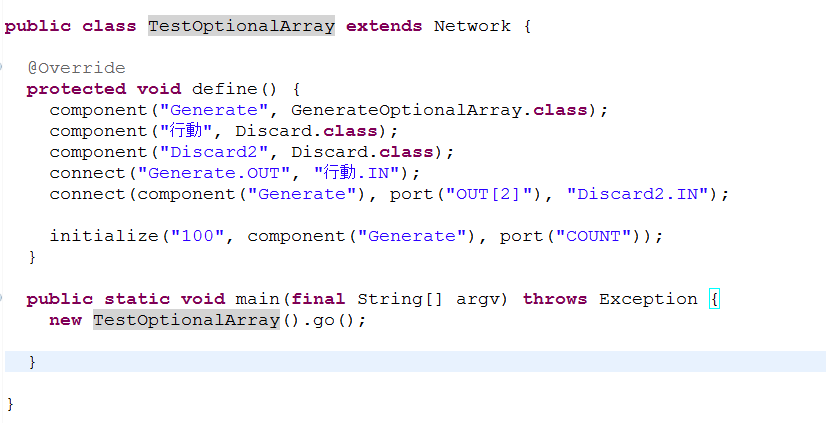
- process names can now be specified using Unicode, e.g. Chinese:
As of version 2.6, JavaFBP now checks that components only receive and send packets containing data of the type specified in the class annotations. This uses the Java isAssignableFrom() method - e.g. if the port annotations specify Object (the default), this port may send or receive packets containing anything.
(*) Connection counts are identified by the name of the connection's downstream port, as there can only be one of these for a given connection.
(*) A sample component has been added to the jar file, called DispIPCounts,
using
the
getIPCounts()
method, which
outputs
the
requested
counts at intervals specified in an IIP.
This is just to give an
idea of what could be done. Here is some sample output from this
component (connections are identified by the name of their
downstream - i.e. input.port):
| 2011.03.21T14:07:25:647
TestIPCounting.Discard.IN
9763 2011.03.21T14:07:25:656 TestIPCounting.ReplStr.IN 9787 2011.03.21T14:07:26:160 TestIPCounting.Discard.IN 37865 2011.03.21T14:07:26:160 TestIPCounting.ReplStr.IN 37887 2011.03.21T14:07:26:660 TestIPCounting.Discard.IN 67349 2011.03.21T14:07:26:660 TestIPCounting.ReplStr.IN 67360 |
Network
Definitions
Since the way the syntax relates to the underlying diagram may not
be all that clear, a brief description is in order. At the end of
this page, I have given an extremely
simple JavaFBP component.
Any JavaFBP network definition starts as follows:
|
where xxxxxx is the Network name, including the usual
imports, copyright statements, etc. Of course you will have to import
classes
for JavaFBP objects, such as Network and Component, as well as any
JavaFBP "verb"
classes you may be using.
The network definition is terminated with:
}
|
In between the beginning and the ending statements defining the network, you specify a list of connections, using the following methods, which I will refer to as "clauses":
-
component- define an instance of a component (an FBP "process")
connect- define a connection-
initialize- define a connection including an Initial Information Packet (IIP) -
port- define a port on a process
Every component instance must have a unique character string identifying it, which allows other component instances or initial information packets (IIPs) to be attached to it via a connection.
The following method call:
component("xxxx")
returns a reference to a component instance. The first reference to this particular component instance must specify the component class to be executed by that occurrence. This is done by coding
component("xxxx", cccc.class)
where cccc is the name of the Java module to be
executed.
Similarly, a port is identified by a port clause, e.g.
port("xxxx").
A port may be an array-type port, in which case the port clauses referring to its elements have index values, as follows:
port("xxxx",n)
where "n" runs up monotonically from 0. Each element of the port array
will be connected to a different component occurrence or IIP.
A connect or initialize clause may contain the
relevant
component clauses, together with their corresponding port
clauses, embedded within it, as e.g.
connect(component("Read", ReadText.class),
|
or the connect and component portions may be in
separate statements,
provided component precedes any connects that
reference it.
A connect contains:
- "from"
componentclause - "from"
portclause - "to"
componentclause - "to"
portclause
- (optional) connection capacity, specified as an
int - (optional)
IP
count
facility
desired,
specified
as
a
boolean
These last two may
appear in either order if present, and one or both may be omitted.
If the optional fifth parameter (connection capacity) is omitted, the
default value is used: 1 for testing, or 10 for
production (the static int
value defaultCapacity
in the Network class has to be set either to DEBUGSIZE (1)
or PRODUCTIONSIZE (10)).
If the optional sixth parameter (IP count facility desired) is
specified as true, the number of IPs passing across this connection is
continuously updated in a synchronized internal HashMap, keyed on the full process name (process name
preceded by the name of containing subnet process (separated by a
period) and so on recursively) and port name. An example of a
sample component that displays any specified counts at some interval
specified in an IIP is included in jar files - versions 2.5 and later -
under the name DispIPCounts.
The
network
demonstrating
the
use
of
this
function
is
in
test.networks,
called
TestIPCounting.
If an asterisk (*) is specified for the
"from" port, this is called an "automatic output port", and indicates a
signal generated when the "from"
component instance terminates (actually the port is just closed, so no
packet has to be disposed of).
If an asterisk (*) is specified for the "to" port,
this is called an "automatic input port", and indicates a delay
- the "to" component instance does not
start until a signal or a close is received at this port.
If *SUBEND is specified as a port name on a subnet, a packet
containing null is
emitted at this port every time the subnet deactivates, i.e. all the
contained components terminate. It doesn't have to be named in
the port
metadata. This null packet is emitted for all
activations, including the last one.
An initialize clause contains:
- a reference to any object
- a
componentclause - a
portclause
as e.g.
initialize(new FileReader(
|
However, it has been recommended that IIPs should be strings, rather than arbitrary objects, to facilitate future graphical management of networks.
One last point: any number of "from" ports can be connected to a single "to" port; only one "to" port can ever be connected to a given "from" port.
A "named global" facility has been provided - putGlobal(String,
Object) - which can be used to make an object available to all
components, using the getGlobal(String): Object method.
putGlobal(String, Object) adds an object to a global
HashMap using a String as identifier; getGlobal(String): Object
can be used by a component to retrieve said object using the same
String value.
CAUTION: this is extremely dangerous, as it runs counter to FBP philosophy. It should be used very carefully!
Sample Network
Let us code up a network implementing the following picture:
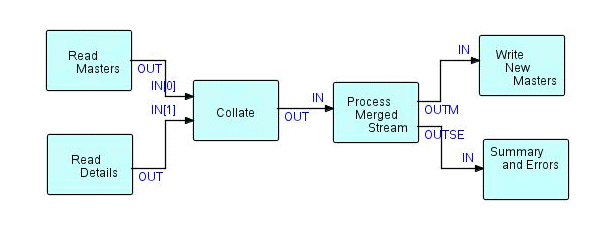
First list the component clauses, together with the
component classes they are to execute (assuming that component classes
have been written to execute the various nodes of the diagram), e.g.:
|
Now these component clauses may either be made into
separate
statements or they can be imbedded into the connect
statements that
follow. Here are the connections in the diagram, without imbedded component clauses:
connect(component("Read Masters"),port("OUT"),component("Collate"),
|
So you can either separate your component and connect
statements, or add the
class designation to the first component clause referencing a
particular component occurrence, giving the following:
|
Now "Read Masters" and "Read Details" use the same Java class, so we
need some way to indicate the name of the file that each is going to
read. This is done using Initial Information Packets (IIPs). In this
case they might usefully specify FileReader objects, so we need to add
two initialize clauses, as follows:
|
Note that, since both "Read" component occurrences use the same class code, they naturally have the same port names - of course, the ports are attached to different IIPs.
Remember that back-slashes have to be doubled in Java character strings! Process names can contain any character - but double quotes in the name must be "escaped" using a back-slash.
"Write New Masters" will have to have an IIP to specify the output destination - perhaps:
|
Note also that this IIP is not a destination for the Writer - it is an object used by this component occurrence so that the latter can figure out where to send data to.
Add the beginning and ending statements, and you're done! The
actual sequence of connect and initialize
statements is irrelevant.
Here is the final result:
|
Simplified Notation (JavaFBP-2.0+)
In the latest release of JavaFBP, we have introduced a new, simplified
notation, in
addition to that shown above. In this notation connect
specifies
two character strings, and initialize specifies an object and
a character string. In both cases, the second character
string specifies a combination of component and port, with the two
parts separated by a period. Array port indices, if required, are
specified using square brackets,
e.g.
"component.port[3]"
The old port notation will still be supported, but is only really
needed
when the port index is a variable. When debugging, it will be
noted that the square bracket notation is used in trace lines, even
when it was not used in the network definition.
Component names must of course not include periods or most special
characters, but they may include blanks, numerals, hyphens and
underscores, and they must be associated with their implementing class
using a (preceding) component statement.
Here is the above network using the new notation:
|
Here is a network example showing how variable port numbers can be used
with the LoadBalance function to define an (admittedly fairly trivial)
self-balancing network.
This also shows a slightly different way
of specifying the define function, which avoids having to
remember to change the network name in the main()
method, when you do cut and paste. Its disadvantage is that trace
output will show a "generated" network name, rather than the actual one.
|
Simple Subnet
As described in the book, networks can be built up level by level,
using what we call "subnets" - they may be thought of as networks with
"sticky" connections. Here is a very simple subnet.
Note the metadata - a subnet can act as a component, so metadata is
required.
|
Component Coding
Components are basically simple Java classes, which extend Component. The class Component really describes a JavaFBP "process", (or instance of a component), but has been retained for historical reasons.
Sample Component
This component generates a stream of 'n' IPs, where 'n' is specified
in an InitializationConnection (specified by an initialize
clause in the foregoing). Each IP just contains an arbitrary string of
characters, in
order to illustrate the concept. Of course any copyright
information included is up to the developer.
The statements starting with @OutPort
are called the component metadata, and are described below in the
section called "Component Metadata".
A JavaFBP component basically consists of 5 sections:
- package
- import statements
- metadata
- declares for ports
openPorts()methodexecute()method
Here is a sample component:
package com.jpmorrsn.fbp.components;
|
The scheduling rules for most FBP implementations are described in the chapter of my book called Scheduling Rules.
In earlier JavaFBP versions, the scheduler presented an IIP
to a component once per invocation.
This
has
been
changed
as
of JavaFBP-2.6
to once per
activation. In practice this will only affect
"non-loopers" (components that
get reactivated multiple times).
There are a few other minor changes to component code as of JavaFBP-2.0:
- As good programming practice, we now feel that IIP ports should be closed after a receive has been executed, in case it is attached to an upstream component (rather than an IIP), and that component mistakenly sends more than one IP - this statement has accordingly been added to the above example.
- The
dropstatement now takes the packet as a parameter, rather than being a method of Packet. - The send is now unconditional - it either works or crashes (it can be made conditional by means of the isConnected() method).
- We are adding a "long wait" state to components, specifying a timeout value in seconds. This is coded as follows:
        double _timeout = 2;   // 2 secs

            ....

        longWaitStart(_timeout);

  //   activity taking time goes here

       longWaitEnd();
complain). dropOldest attribute. This is specified by having connect return a Connection object, and then invoking setDropOldest() on it. Here is an example:
        Connection c = connect(component("Generate", GenerateTestData.class),
                        port("OUT"),
                        component("SlowPass", SlowPass.class), port("IN"));

        c.setDropOldest();
A connection tagged with dropOldest will still activate an inactive downstream process, but, if the feeding process would normally suspend because there is no room for new data packets in the connection, the oldest IP will be dropped. This attribute is useful when a measuring device is generating a stream of measurements, and it is not necessary to process every single one. A similar case might be that of mouse movement events during a "drag" function.
LoadBalance has been modified so that all the IPs in a substream are routed to the same output port element.
There is also a corresponding component called SubstreamSensitiveMerge, but, if this is combined with LoadBalance, there is a strong possibility of deadlocks - see GitHub/JavaFBP Issue #8.
Component Metadata:
- Input and output port names will be coded on components using Java 5.0 "attribute" notation. This metadata can be used to do analysis of networks without having to actually execute the components involved. Here is an example of the attributes for the "Collate" component:
    @OutPort("OUT")
    @InPorts({
      @InPort("CTLFIELDS"),
      @InPort(value = "IN", arrayPort = true)
      })

    public class Collate extends Component {
@MustRun
<output port name>.isConnectedreturnsboolean- To support
isConnected, a new metadata attribute calledoptionalhas been added to @OutPort, e.g.
@OutPort(value = "OUT", optional = true)
- Network definitions are Java executable code, so port names can be computed rather than explicitly spelled out (as in the example above). However, @InPort and @OutPort do not support this kind of symbol manipulation, so a parameter has been added to these classes called setDimension, which allows a series of port names consisting of a string followed by numbers from 0 on up to 'n-1' to be specified, where the setDimension argument is 'n'.
- In this case, the value string must end with an asterisk, and the asterisk will be replaced with the numbers 0, 1, 2, ... 9, 10, 11, etc. Thus, if the name is specified as "IN*", and setDimension(4), this will be equivalent to "IN0", "IN1", "IN2", "IN3".
- A new parameter, valueList(),
has
been
added
to
the
@InPort
and @OutPort
annotations,
allowing a list of names of ports with the same attributes to be
specified. If valueList()
is used in conjunction with setDimension(),
at
least
one
list
element
must
end
with
an
asterisk.
List
elements
without
the
asterisk
will
just
ignore
the
setDimension
parameter.
- A new annotation, @SelfStarting, has been added, indicating that the process starts at the beginning of job even if it has input ports.
- A new Exception has been added as of JavaFBP 2.5: ComponentException. This can be used to terminate a component occurrence from inside a nested subroutine. It is thrown with an integer argument, and will be caught by the nearest "catch" going up the call stack. If there are no "catch"es lower down, the throw will be caught by the scheduler, and the component occurrence will deactivate. At this point, its behaviour, after deactivating, will be as follows for various values of the integer argument:
- 0: none
- 1-999: generate a trace line if tracing enabled
- 1000 or greater: bring down the network with a
"complain"
call.
- A ComponentException can also be thrown with a string argument, in which case the integer value is treated as zero.
Input ports and input array port elements are always treated as
optional.
Component Metadata
Component Metadata:
|
Component API
Packet class
/**
|
Component class
/**
|
InputPort interface
Packet = receive();
|
Connection class
void setDropOldest(); // as of 2.8
|
OutputPort class
void send(Packet packet);
|